For the complete documentation index, see llms.txt. This page is also available as Markdown.

Borrow

Lock collateral in a CDP and mint a synthetic against it.

A collateralized debt position (CDP) lets you borrow a synthetic against collateral. Each CDP belongs to one synthetic market and holds collateral, borrowed principal and a rate cap. Before creating one, check the market's borrow rate, minimum position and accepted collateral on Markets.

Create a CDP

1

Choose the market and collateral

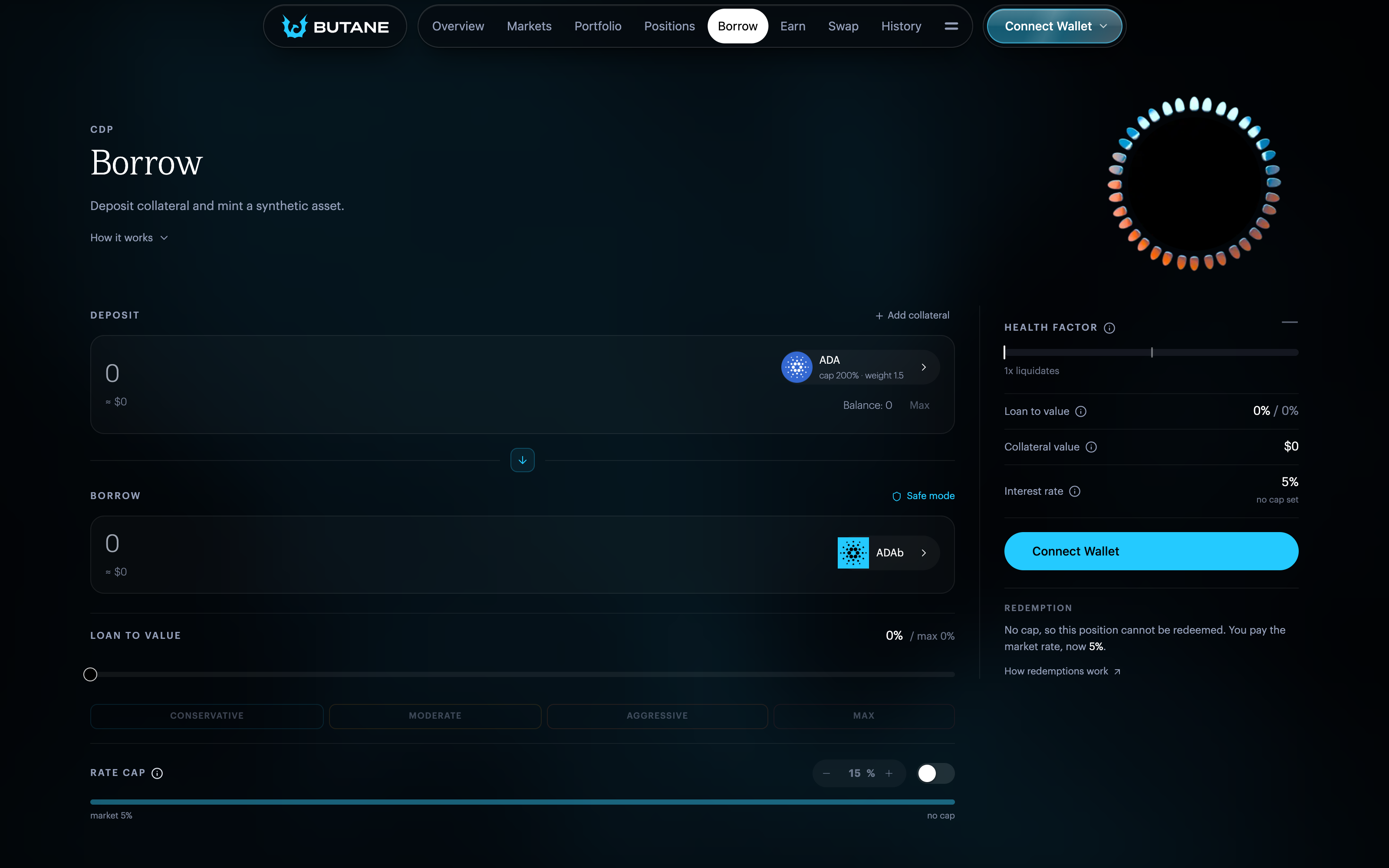
Open Borrow and choose the synthetic to borrow. Add the collateral assets and the amount of each to deposit.

2

Set the amount

Enter the amount to borrow, or set a loan-to-value level with the slider or the Conservative, Moderate, Aggressive and Max presets.

3

Set the rate cap

Set the Rate cap, or leave it off. See Rate cap below.

4

Review and submit

Check the debt, loan-to-value ratio and health factor. Select Borrow, then submit the transaction.

Butane Borrow page
Creating a CDP on the Borrow page.

Before your first CDP, the app asks you to take a short Knowledge Test on how the protocol works and what the risks are.

After the transaction is confirmed, the CDP appears under Portfolio and Positions, and interest starts accruing.

Rate cap

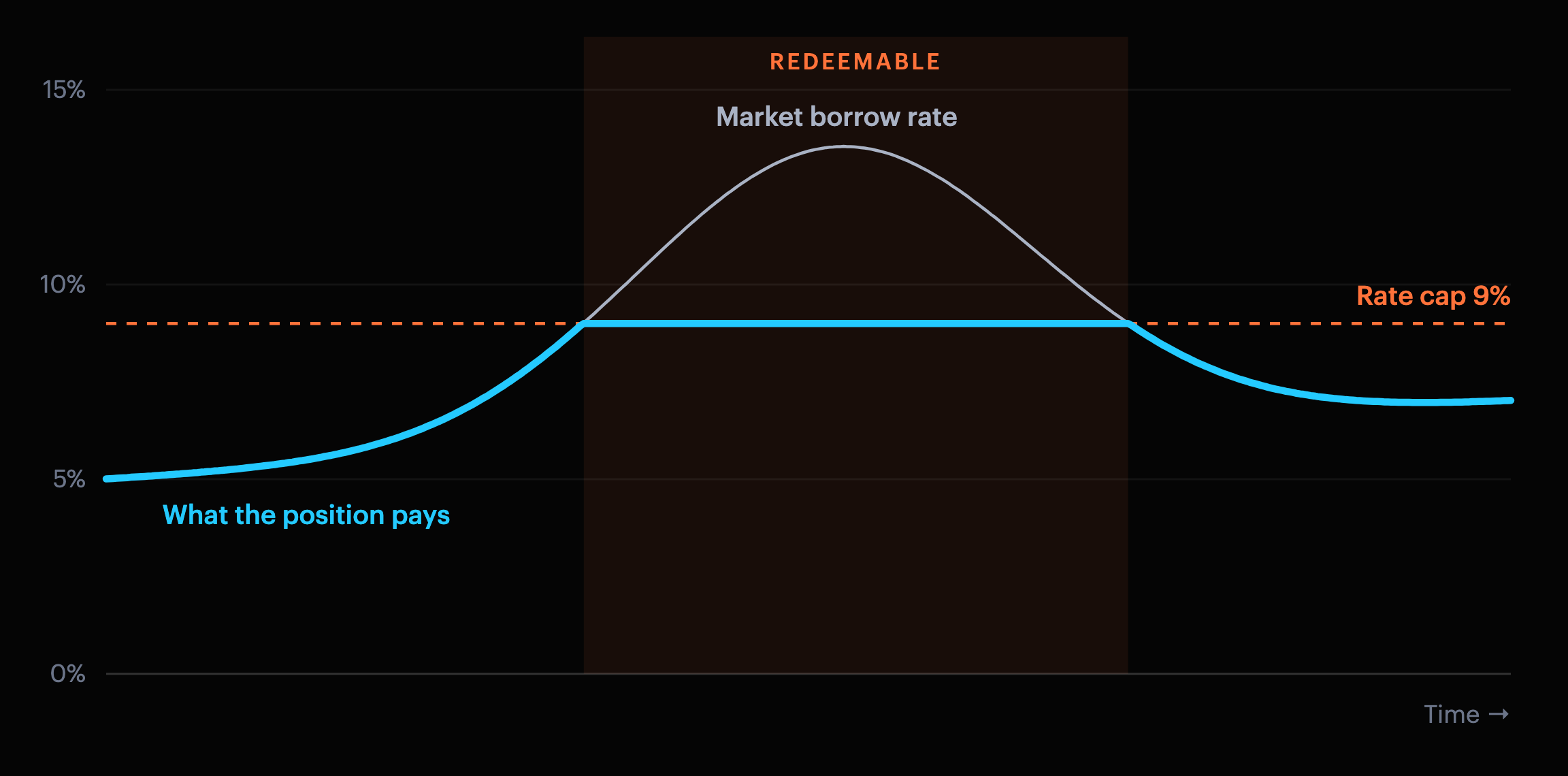
The rate cap is the highest borrow rate you are willing to pay, and it must be at least the current market rate when you set it. While the market rate is below your cap, the CDP pays the market rate. If the market rate rises above your cap, the CDP pays the cap instead (or the market's savings rate, if that is higher), and it becomes redeemable.

Chart of a market borrow rate rising above a 9% rate cap and falling back, with the rate a position pays following the market rate up to the cap
A CDP with a 9% cap pays the market rate until the rate passes the cap. While the rate is above the cap, the CDP pays the cap and can be redeemed. The example assumes the savings rate stays below 9%.

While a CDP is redeemable, anyone can repay part of its debt and take collateral worth the repayment, adjusted by the market's redemption share. See Redeem.

With the cap turned off, the CDP always pays the market rate and cannot be redeemed.

Interest

The amount you owe is the principal plus accrued interest. Interest accrues at the market borrow rate, limited by your rate cap, and is paid when the CDP is repaid, adjusted, liquidated or redeemed against.

Health factor

The health factor compares a CDP's collateral with its debt. Each collateral asset counts for its value divided by its weight, and can cover at most its maximum proportion of the debt. The health factor is the total that counts, divided by the debt:

HF=1s∑imin⁡(xiwi, s mi)\text{HF} = \frac{1}{s}\sum_i \min\left(\frac{x_i}{w_i},\ s\,m_i\right)

Here ss is the CDP's debt and, for each collateral asset ii, xix_i is its value in the synthetic, wiw_i its weight and mim_i its maximum proportion. Each market sets the weight and maximum proportion of every asset it accepts. See Market parameters.

A health factor of 1 means the CDP has exactly the borrowing capacity its debt needs. Below 1, anyone can liquidate it. Collateral prices, debt and accrued interest all move the health factor.

Health factor scale: liquidatable below 1.0, critical below 1.1, at risk below 1.5
The app shows a health factor red below 1.1 and orange below 1.5. The Positions filters call these Critical and At risk.

Collateral above an asset's maximum proportion stays yours but does not add borrowing capacity. The Borrow form flags this excess, and Rebalance removes it.

While a CDP's health factor is at least 1, the app's Health Factor also counts collateral above the maximum proportions, so it can read higher than this calculation.

Safe mode

Safe mode keeps an extra collateral buffer when you borrow or adjust a CDP, and blocks changes that would leave less than that buffer. It is on by default, and you can turn it off in Settings. Safe mode does not protect a CDP from liquidation or redemption later.

Last updated

Was this helpful?